
Free · runs in your browser

Add a white border to a video

Open a clip and it is already framed in white. Make the border thinner or thicker, even out the sides, and save a fresh MP4, all on your own device.

Drop a video to frame itChoose a video to frame

It appears inside a clean white border straight away. Change the look in one click.Pick a clip from your photos or files. It stays on your phone.

Works with MP4MOVWebMMKVand more

Framed on your device. Your video is never uploaded.

  1. 1Choose
  2. 2Frame
  3. 3Download

To add a white border to a video, open it in the tool above: it appears straight away inside a Clean white frame. Drag Border width to make the white edge thinner or thicker, then press Export video. The border is drawn into every frame, so it shows on every phone, laptop and social app, not just in one player.

White borders are popular because they make a clip look like a printed photo and stop it bleeding into a dark feed. With Shape left on Original, the canvas simply grows round the video, so the picture keeps every pixel of its own resolution. If the clip is going to Instagram or TikTok, switch the shape instead: a square frame or a 9:16 frame adds the white space where the platform needs it.

How to put a white border round a video

  1. Open the clip

    Drop the video on the tool or press Select video (Choose video on a phone). It opens already framed with Clean white.

  2. Set the thickness

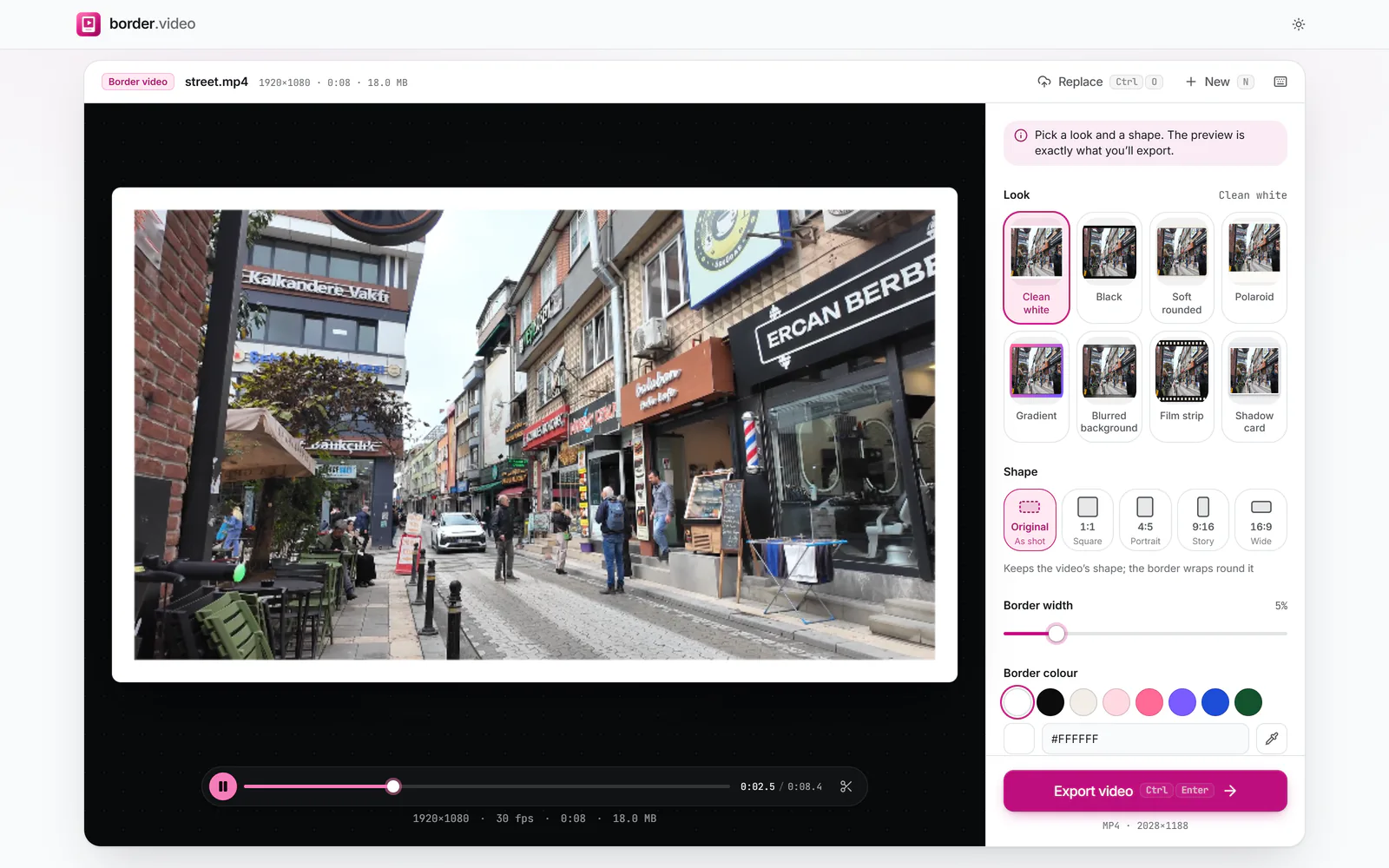
    Drag Border width. The value is a percentage of the video’s shorter side, so 5% looks the same on a phone clip and a 4K file.

    A street video inside an even white border, with the Border width slider at 5% (enlarge image)

    Border width sets the white edge as a percentage of the shorter side.

    1. Border width
  3. Fine-tune if you like

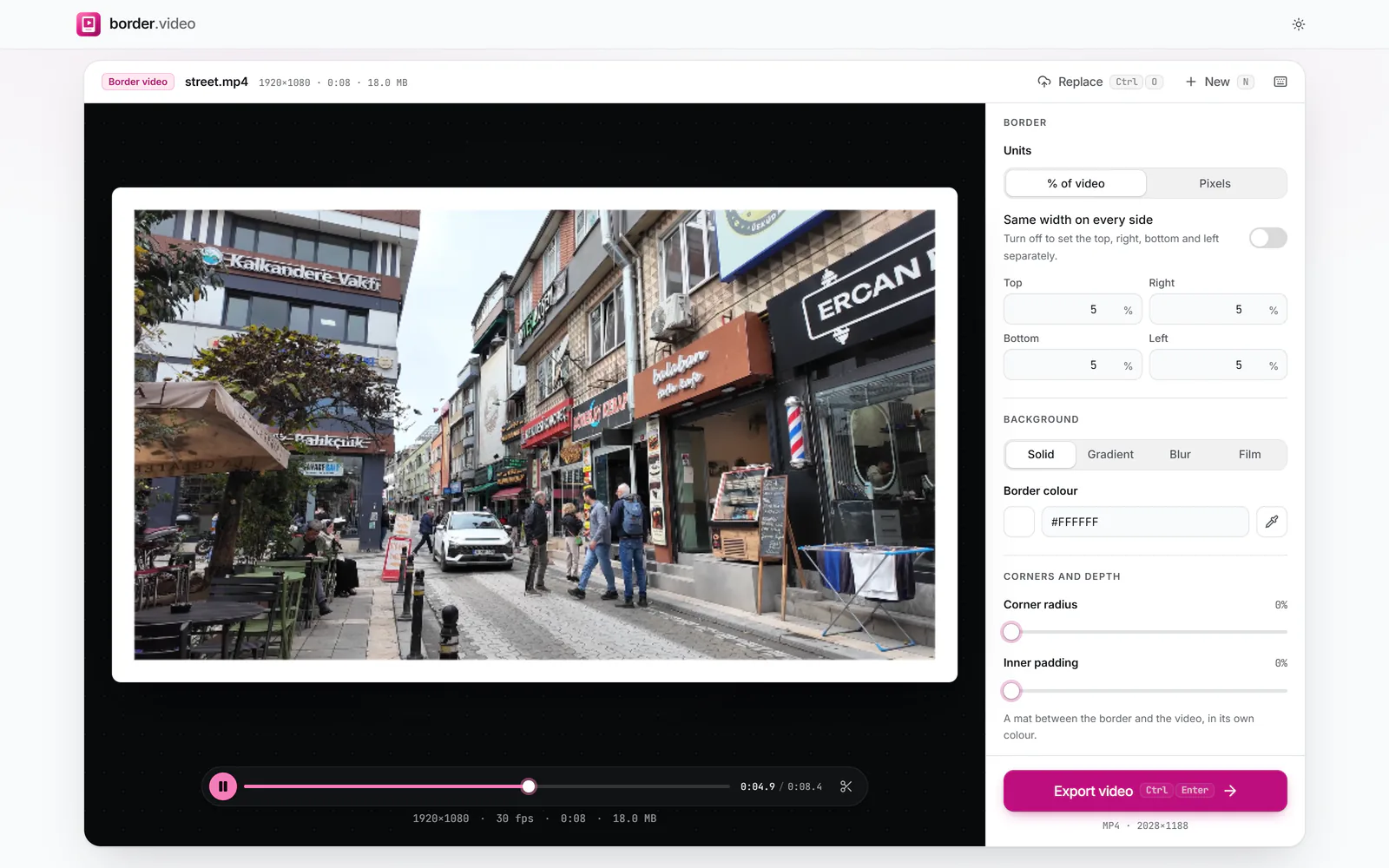
    Open More options to switch Units to Pixels for an exact width, or turn off Same width on every side to set each edge.

    More options open with Same width on every side switched off and separate Top, Right, Bottom and Left widths (enlarge image)

    Turn off Same width on every side to set each edge.

  4. Export and save

    Press Export video, then Download video. On a phone, Share sends the file to Photos or an app.

How thick should a white border be?

There is no rule, but three widths cover most uses. Thin borders of 2 to 3% read as a neat keyline and suit clips shown full screen. Around 5%, the default, gives the familiar gallery-print feel. From 8% upwards the frame becomes part of the design and works well for slow, scenic clips or a series that should look consistent on a profile.

Because the width is measured against the shorter side, a 5% border is 54 px on a 1080p video and 108 px on 4K, so the look carries across clips of different sizes. Choose Pixels under More options when a brief asks for an exact number, such as a 40 px edge.
White, off-white or black?

Pure white (#FFFFFF) is crisp but can glare on a phone at night. A warm off-white such as #F3EEE7, one of the swatches under Border colour, feels softer and suits film-style footage. You can type any hex value or, in Chrome and Edge, use the eyedropper to pick a colour straight from the preview.

For a black frame, pick the Black look. Black borders vanish on dark-mode feeds, which is useful when you want the frame to read as cinematic letterboxing rather than a visible edge.

Does a white border change the video size?

With Original, yes, slightly: the border is added outside the picture, so a 1920×1080 video with a 5% border becomes 2028×1188. Nothing in the picture is shrunk or cut. With a fixed shape the canvas has standard dimensions instead, and the video is scaled down a little to make room for the frame.

  • Original: the video keeps its own pixels; the canvas grows.
  • 1:1, 4:5, 9:16, 16:9: a standard-size canvas; the video shrinks to fit inside the border.
  • Export settings → Size: cap the output at 1080p or 720p for a smaller file.

White border questions

Can I add a white border without changing the video’s resolution?

Yes. Leave Shape on Original. The canvas grows to hold the border and the picture keeps its own pixels, so nothing is scaled. The video is still re-encoded, because the border is drawn into every frame.

Can I make the border thicker at the bottom only?

Yes. Open More options and turn off Same width on every side, then type a bigger Bottom value. The Polaroid look starts with a deep bottom edge if you want a head start.

Will the white border show on Instagram and TikTok?

Yes. It is part of the picture, so every app shows it. To stop an app cropping into the frame, also set Shape to the platform’s size, such as 4:5 for Instagram posts or 9:16 for Reels and TikTok.

Can I add a white border to only part of the video?

Not on its own: the border runs for the whole video, or for the part you keep with the trim scissors under the preview.

Is the sound kept?

Yes. Keep sound is on by default under Export settings. Turn it off for a silent copy.

Can I add a white border on my phone?

Yes. Open this page in Safari or Chrome, choose the clip from your library, and export. When it finishes, tap Share and pick Save Video to put it back in Photos.